<?xml version="1.0" encoding="utf-8"?>
<feed xmlns="http://www.w3.org/2005/Atom">

  <title><![CDATA[mattyw]]></title>
  <link href="http://mattyw.github.io/atom.xml" rel="self"/>
  <link href="http://mattyw.github.io/"/>
  <updated>2016-05-03T13:48:52+01:00</updated>
  <id>http://mattyw.github.io/</id>
  <author>
    <name><![CDATA[Matt Williams]]></name>
    
  </author>
  <generator uri="http://octopress.org/">Octopress</generator>

  
  <entry>
    <title type="html"><![CDATA[How I write go]]></title>
    <link href="http://mattyw.github.io/blog/2016/05/03/how-i-write-go/"/>
    <updated>2016-05-03T09:16:00+01:00</updated>
    <id>http://mattyw.github.io/blog/2016/05/03/how-i-write-go</id>
    <content type="html"><![CDATA[<p>For a while I&rsquo;ve been wanting to do a short video to show my workflow for writing go.
Last week I had a small bug to fix which I thought would fit perfectly, so I recorded
me fixing it, and put some ragtime over the top.</p>

<iframe width="560" height="315" src="https://www.youtube.com/embed/PEbnzuMZceA" frameborder="0" allowfullscreen></iframe>


<p>For those who are interested, here&rsquo;s a list of my tools:</p>

<ul>
<li>Tmux <a href="https://github.com/mattyw/dotfiles/blob/master/tmux.conf">(my tmux.conf is here)</a></li>
<li>Vim &ndash; with no syntax highlighting &ndash; honestly, try it.

<ul>
<li>Vim is <a href="https://github.com/mattyw/dotfiles/blob/master/vimrc#L12">configured to run gofmt on save</a></li>
</ul>
</li>
<li><a href="https://github.com/mattyw/dotfiles/blob/master/t">&ldquo;t&rdquo; is a script I wrote</a> which notifys when the process is done. This is useful for long running tests</li>
<li><a href="https://github.com/rogpeppe/godef">godef</a> and <a href="https://github.com/dgryski/vim-godef">vim-godef</a></li>
</ul>

]]></content>
  </entry>
  
  <entry>
    <title type="html"><![CDATA[Juju, LXD, Ubuntu Snappy and a Raspberry pi 2]]></title>
    <link href="http://mattyw.github.io/blog/2015/12/02/juju-lxd-snappy-pi/"/>
    <updated>2015-12-02T23:21:00+00:00</updated>
    <id>http://mattyw.github.io/blog/2015/12/02/juju-lxd-snappy-pi</id>
    <content type="html"><![CDATA[<p>I&rsquo;ve <a href="http://blog.mattyw.net/blog/2015/10/18/snappy-juju-flasher-video/">previously</a> shown juju running on a raspberry pi 2, albeit deploying
servers in ec2. Recently the lxd project <a href="https://linuxcontainers.org/lxd/getting-started-cli/">released a snap</a> that can be used
to install lxd on ubuntu snappy, it even works on a raspberry pi 2.
Around the same time lxd provider support landed in the master branch of juju.
Naturally I thought it would be cool if I could use juju to spin up some units using lxd
on my raspberry pi 2.</p>

<p>The following video shows it in action:</p>

<iframe width="560" height="315" src="https://www.youtube.com/embed/GHUWc725U84" frameborder="0" allowfullscreen></iframe>


<p>Obviously, it&rsquo;s slow and unofficial, but it&rsquo;s fun. For the curious these were the steps involved in getting this working.</p>

<ul>
<li>Juju was compiled using a raspbian image and <a href="http://dave.cheney.net/unofficial-arm-tarballs">Dave Cheney&rsquo;s arm release of go</a>.</li>
<li>I needed to turn video memory right down and the available swap space up to 1GB, my sd card will not be happy.</li>
<li>The compiled binaries were copied to my laptop where I built the juju snap and uploaded it to the raspberry pi 2 running ubuntu snappy.</li>
<li>Juju wasn&rsquo;t able to access the unix socket lxd was using. So lxd was configured to work remotely, and juju was using it remotely (they just happened to be running on the same host)</li>
<li>Some of juju&rsquo;s upstart scripts set extra limits on allowable open files and processes. upstart wouldn&rsquo;t start these services as they were beyond what was allowed. I removed these from the
upstart file, which isn&rsquo;t something you&rsquo;d want to do normally.</li>
</ul>


<p>Not exactly production ready stuff, but playing is fun.</p>
]]></content>
  </entry>
  
  <entry>
    <title type="html"><![CDATA[go binary charm layer]]></title>
    <link href="http://mattyw.github.io/blog/2015/11/25/go-binary-charm-layer/"/>
    <updated>2015-11-25T09:26:00+00:00</updated>
    <id>http://mattyw.github.io/blog/2015/11/25/go-binary-charm-layer</id>
    <content type="html"><![CDATA[<p>I like go. One of the things I like is not worrying about dependencies during deployment.
You just scp your binary to your server and you&rsquo;re done. Well, after you configure it to connect to the
database, ah yes, we forgot about haproxy, let&rsquo;s set that up as well, but after scping to
a server and doing some minor setup you&rsquo;re ready to go, scale it out you say? Just scp to other
servers, do the same config setup&hellip;&hellip;..</p>

<p>The solution to this problem is to use an orchestration tool like <a href="https://juju.ubuntu.com/about">juju</a>. Now thanks to the <a href="https://github.com/cloud-green/go-binary-layer">go binary layer</a> orchestrating your go program with juju couldn&rsquo;t be easier.</p>

<p>Here&rsquo;s how it works. The go-binary layer looks in the top level of your charm for a go-binary.yaml file that contains the name of your binary and any arguments that should be passed to it.</p>

<figure class='code'><figcaption><span></span></figcaption><div class="highlight"><table><tr><td class="gutter"><pre class="line-numbers"><span class='line-number'>1</span>
<span class='line-number'>2</span>
<span class='line-number'>3</span>
</pre></td><td class='code'><pre><code class='yaml'><span class='line'><span class="c1">#go-binary.yaml</span>
</span><span class='line'><span class="l-Scalar-Plain">binary</span><span class="p-Indicator">:</span> <span class="l-Scalar-Plain">server</span>
</span><span class='line'><span class="l-Scalar-Plain">args</span><span class="p-Indicator">:</span> <span class="l-Scalar-Plain">/etc/myserver/config.yaml</span>
</span></code></pre></td></tr></table></div></figure>


<p>Your compiled binary should be placed in a &ldquo;files&rdquo; directory at the top level of your charm. Build your charm and you&rsquo;re all done.</p>

<figure class='code'><figcaption><span></span></figcaption><div class="highlight"><table><tr><td class="gutter"><pre class="line-numbers"><span class='line-number'>1</span>
<span class='line-number'>2</span>
<span class='line-number'>3</span>
<span class='line-number'>4</span>
<span class='line-number'>5</span>
<span class='line-number'>6</span>
<span class='line-number'>7</span>
</pre></td><td class='code'><pre><code class='bash'><span class='line'><span class="nv">$ </span>tree
</span><span class='line'>.
</span><span class='line'>├── files
</span><span class='line'>│   ├── server
</span><span class='line'>├── go-binary.yaml
</span><span class='line'>├── layer.yaml
</span><span class='line'>├── metadata.yaml
</span></code></pre></td></tr></table></div></figure>


<p>Under the covers the go-binary layer will add your binary to $PATH,write an upstart file for your binary and start it when the server starts.</p>

<p>There are examples of this in action with the http (website) relation (<a href="https://github.com/mattyw/simple-server-charm">https://github.com/mattyw/simple-server-charm</a>)</p>

<p>and with the mongodb relation (<a href="https://github.com/mattyw/simple-server-mongo-charm">https://github.com/mattyw/simple-server-mongo-charm</a>).</p>

<p>If you&rsquo;d like to see these charms in action take a look at the following videos:</p>

<iframe width="560" height="315" src="https://www.youtube.com/embed/YgYOyf-3QwU" frameborder="0" allowfullscreen></iframe>


<iframe width="560" height="315" src="https://www.youtube.com/embed/Cf5o58MzCjs" frameborder="0" allowfullscreen></iframe>

]]></content>
  </entry>
  
  <entry>
    <title type="html"><![CDATA[jupsen: modelling networking partitions with juju]]></title>
    <link href="http://mattyw.github.io/blog/2015/11/02/jupsen-modelling-networking-partitions-with-juju/"/>
    <updated>2015-11-02T22:11:00+00:00</updated>
    <id>http://mattyw.github.io/blog/2015/11/02/jupsen-modelling-networking-partitions-with-juju</id>
    <content type="html"><![CDATA[<p>Jupsen is a tool that allows you to drop or delay packets between juju units.</p>

<h2>Why is this useful?</h2>

<p>Network problems happen, if you&rsquo;re working on a distributed system you need
to deal with them, this is much easier to do if you&rsquo;re able to recreate these
situations easily.</p>

<p>With jupsen you can</p>

<ul>
<li>Block traffic between two units in only one direction</li>
<li>Block traffic between two units in only both directions</li>
<li>Delay packets in one direction</li>
<li>Delay packets in both directions.</li>
</ul>


<p>This can be used to recreate some of the experiments in Kyle Kingsbury&rsquo;s jupsen series
(from which I have shamefully taken the name) (<a href="https://aphyr.com/tags/jepsen">https://aphyr.com/tags/jepsen</a>)</p>

<p>If you want to have a play around with jupsen you can get it here: (<a href="https://github.com/mattyw/jupsen">https://github.com/mattyw/jupsen</a>)</p>

<p>If you want to see it in action you can take a look at this demo I gave at the recent
Ubuntu Online Summit.</p>

<iframe width="560" height="315" src="https://www.youtube.com/embed/xp54gcMMUfQ" frameborder="0" allowfullscreen></iframe>

]]></content>
  </entry>
  
  <entry>
    <title type="html"><![CDATA[The remote-deployer charm: Playing with Juju during a tea break]]></title>
    <link href="http://mattyw.github.io/blog/2015/10/29/juju-charm-shortcut/"/>
    <updated>2015-10-29T11:23:00+00:00</updated>
    <id>http://mattyw.github.io/blog/2015/10/29/juju-charm-shortcut</id>
    <content type="html"><![CDATA[<p>The power of juju, and its model driven approach to deployments is
undoubtedly the relationships. Being able to specify what services you
depend on and what you provide to other services is extremely powerful.</p>

<p>To get all of those benefits you need to write your app as a charm. With the new
layering approach (<a href="http://blog.dasroot.net/2015-charming-2-point-oh.html">http://blog.dasroot.net/2015-charming-2-point-oh.html</a>) this has
got even easier. There will be more posts about that coming soon.</p>

<p>But I&rsquo;ve always pondered the following:</p>

<p><em>Is there a useful shortcut around writing a charm that would let you deploy your app in &lt; 5 minutes</em></p>

<p>My idea was the remote-deployer charm (<a href="https://jujucharms.com/u/mattyw/remote-deployer/trusty/2">https://jujucharms.com/u/mattyw/remote-deployer/trusty/2</a>)</p>

<p>It doesn&rsquo;t replace writing your own charm, indeed the cases in which it&rsquo;s useful are limited.
(you must have a publicly available file path that you want to deploy from)
<strong>The intention is to facilitate playing with juju in less time than the typical tea break.</strong></p>

<p>The idea goes:</p>

<ol>
<li>Deploy the charm</li>
<li>Give it something to do</li>
</ol>


<figure class='code'><figcaption><span></span></figcaption><div class="highlight"><table><tr><td class="gutter"><pre class="line-numbers"><span class='line-number'>1</span>
<span class='line-number'>2</span>
</pre></td><td class='code'><pre><code class='bash'><span class='line'>juju deploy cs:~mattyw/trusty/remote-deployer-2
</span><span class='line'>juju action <span class="k">do </span>remote-deployer/0 deploy <span class="nb">source</span><span class="o">=</span>https://github.com/mattyw/compojure-app-bootstrap
</span></code></pre></td></tr></table></div></figure>


<p>The something to do is just pointing it at some remote file tree (like a github url).
It downloads this file tree and looks for a file called <strong>remote-deployer</strong>. It runs this
as the ubuntu user. The example above installs the clojure build tool lein and creates
a hello world web app (<a href="https://github.com/mattyw/compojure-app-bootstrap">https://github.com/mattyw/compojure-app-bootstrap</a>)</p>

<figure class='code'><figcaption><span></span></figcaption><div class="highlight"><table><tr><td class="gutter"><pre class="line-numbers"><span class='line-number'>1</span>
<span class='line-number'>2</span>
<span class='line-number'>3</span>
<span class='line-number'>4</span>
<span class='line-number'>5</span>
<span class='line-number'>6</span>
<span class='line-number'>7</span>
<span class='line-number'>8</span>
</pre></td><td class='code'><pre><code class='bash'><span class='line'><span class="c"># remote-deployer</span>
</span><span class='line'><span class="c">#!/bin/sh</span>
</span><span class='line'><span class="nb">set</span> -ev
</span><span class='line'>sudo apt-get install -y --force-yes openjdk-7-jre-headless
</span><span class='line'>sudo cp lein /usr/bin
</span><span class='line'><span class="nb">cd</span> <span class="nv">$HOME</span> <span class="o">&amp;&amp;</span> lein new compojure-app my-app
</span><span class='line'><span class="nb">cd</span> <span class="nv">$HOME</span>/my-app <span class="o">&amp;&amp;</span> nohup lein ring server &amp;
</span><span class='line'>open-port 3000
</span></code></pre></td></tr></table></div></figure>


<p>Juju fans will notice that the normal hook tools are available to you in this file.</p>

<p>If you&rsquo;d like to suggest or help make improvements the project is here: <a href="https://github.com/mattyw/remote-deployer-charm">https://github.com/mattyw/remote-deployer-charm</a></p>

<p>Take a look at in action:</p>

<iframe width="560" height="315" src="https://www.youtube.com/embed/2a2WxDN4ZJM" frameborder="0" allowfullscreen></iframe>


]]></content>
  </entry>
  
  <entry>
    <title type="html"><![CDATA[Video: Juju status flasher on ubuntu snappy]]></title>
    <link href="http://mattyw.github.io/blog/2015/10/18/snappy-juju-flasher-video/"/>
    <updated>2015-10-18T10:02:00+01:00</updated>
    <id>http://mattyw.github.io/blog/2015/10/18/snappy-juju-flasher-video</id>
    <content type="html"><![CDATA[<iframe width="560" height="315" src="https://www.youtube.com/embed/JnbrWRDFqVo" frameborder="0" allowfullscreen></iframe>


<p>I&rsquo;d like to share a proof of concept project I&rsquo;ve been working on that combines
the worlds of ubuntu snappy and juju.</p>

<p>I wanted to use the flashing leds on the raspberry pi 2&rsquo;s piglow to tell me the
status of my cloud services. The idea being that if there&rsquo;s something I need to fix
the flashing leds will tell me, without me having to keep checking my phone or laptop
to get updates.</p>

<p>This demo will use the <a href="https://jujucharms.com/realtime-syslog-analytics/">realtime syslog analytics</a>
big data bundle as my example environment. It&rsquo;s deployed in ec2 but it&rsquo;s controlled and managed
by juju running on my raspberry pi. I&rsquo;m going to show you a working environment with happy led status.
Then I&rsquo;m going to cause some trouble and we&rsquo;ll see the leds change to unhappy.</p>

<p>The idea being that if I want to know the status of my cloud services I only need to glance at my
raspberry pi for a moment.</p>

<p>There&rsquo;s still some work to be done around optimising the various led patterns. There could be a way
that I could convey seriousness of the problem via the leds, or even how long there has been a problem.
That&rsquo;s work that can come later.</p>
]]></content>
  </entry>
  
  <entry>
    <title type="html"><![CDATA[Keep a Logbook and love your tools]]></title>
    <link href="http://mattyw.github.io/blog/2015/10/12/keep-a-logbook/"/>
    <updated>2015-10-12T09:46:00+01:00</updated>
    <id>http://mattyw.github.io/blog/2015/10/12/keep-a-logbook</id>
    <content type="html"><![CDATA[<h2>TL;DR</h2>

<p>If your job requires thinking of any kind you should be keeping a log book/ journal
to keep a note of what you are doing. If you learn to love the process of keeping the journal
it will be even more useful to you.</p>

<h2>The story</h2>

<p>When I first started work I instinctively started keeping a logbook of all of my activities.
I grabbed an A4 notebook out of the stationary cupboard and started writing, this was mostly
because the rate of information coming at me was more than I could handle, so I wanted
somewhere to store it that was better than my head.
But it was also because I could own a nice A4 notebook without having to pay for it, and this was quite a novelty.</p>

<p>Then this year I discovered the <a href="http://www.relay.fm/penaddict">pen addict podcast</a> and (despite
my left handedness) I really got into paper and pens again. For the past 3 months I&rsquo;ve been
keeping a log of my work. Experiments, meetings, things that need fixing, ideas, new tricks, everything to do with my job.</p>

<h2>Keep a Logbook</h2>

<p>This is how I make use of a logbook, it&rsquo;s mostly common sense:</p>

<ol>
<li>Always have it with me, even if I go for a walk.</li>
<li>If you&rsquo;re working at your desk, have it within arms reach.</li>
<li>If you take a break, leave a note of where you&rsquo;ve left off.</li>
<li>When you return from a break refer to your log book to help you regain context.</li>
</ol>


<p>This is what I write:</p>

<ol>
<li>Things I need to remember.</li>
<li>Things I need to do.</li>
<li>Things I want to talk about with colleagues.</li>
<li>Ideas for future projects.</li>
<li>Solutions to problems</li>
<li>Results of experiments I&rsquo;ve done</li>
<li>Cool tricks I&rsquo;ve discovered (editor shortcuts, programming patterns etc)</li>
</ol>


<h2>Reviewing your Logbook</h2>

<p>An important part of any process is reviewing. Most days I will flip through recent pages of my notebooks
and record anything that I think is important in Evernote or my teams kanban board.
The act of reviewing notes also helps cement any new tricks I&rsquo;d learned.
The whole process I use is a topic for another time.</p>

<h2>Love your tools</h2>

<p>Something I&rsquo;ve known to be true in programming for a number of years is that if you
can learn to really love the tools you use then no matter how mundane your task seems to
be you will love doing it, because using the tools is part of the fun. I&rsquo;ve started to realise
that the same is true of a number of walks of life. I&rsquo;ve bought a couple of fountain pens, made my own
pocket and full size midori notebooks, spent a stupid amount of money on field notes. But I
also have a collection of programming related notes, ideas, insights that I keep catalogued. The
process of writing all these notes is one I enjoy, in fact I look forward to it because I&rsquo;ve come
to love the tools I use to do it.</p>

<h2>My tools</h2>

<p><img src="http://mattyw.github.io/images/notebooks.jpg"></p>

<p>Here&rsquo;s my current stuff (left->right, top->bottom)</p>

<ol>
<li>A4 clipboard from some team building thing I did a number of years back.</li>
<li>A Field notes sized fauxdori (it also supports midori inserts).</li>
<li>A lamy safari with LH nib.</li>
<li>A Kaweco skyline with F nib.</li>
<li>Full size fauxdori. (It also support field notes)</li>
</ol>


<p>I made both fauxdoris myself, which means the act of using them is a pleasure in itself.</p>
]]></content>
  </entry>
  
  <entry>
    <title type="html"><![CDATA[Simple piglow snap for Raspberry Pi 2]]></title>
    <link href="http://mattyw.github.io/blog/2015/10/09/simple-piglow-snap-for-raspberry-pi-2/"/>
    <updated>2015-10-09T22:43:00+01:00</updated>
    <id>http://mattyw.github.io/blog/2015/10/09/simple-piglow-snap-for-raspberry-pi-2</id>
    <content type="html"><![CDATA[<p>Using a Raspberry Pi 2 with Ubuntu Snappy installed we&rsquo;re going to write a
simple snap that will flash a piglow attached to the gpio pins.</p>

<p>If you want to skip these steps you can download the snap itself from <a href="https://www.dropbox.com/s/2o298qugyts0r3o/hello-piglow_1.0.0_all.snap?dl=0">here</a></p>

<h2>1. A simple piglow flashing binary</h2>

<p>To make things simple we&rsquo;ll use go to produce a simple binary that will
flash the legs of the piglow. We&rsquo;re using go because the static compilation means
our snap will have no dependencies to deal with. The code itself is small.
<a href="https://github.com/mattyw/flasher">https://github.com/mattyw/flasher</a>
I modified the piglow library I was using to get a bit more feedback about piglow
errors, the change is trivial to revert should you need to.</p>

<h2>2. Create the snap</h2>

<p>The package structure is simple</p>

<figure class='code'><figcaption><span></span></figcaption><div class="highlight"><table><tr><td class="gutter"><pre class="line-numbers"><span class='line-number'>1</span>
<span class='line-number'>2</span>
<span class='line-number'>3</span>
<span class='line-number'>4</span>
<span class='line-number'>5</span>
</pre></td><td class='code'><pre><code class='bash'><span class='line'>├── bin
</span><span class='line'>│   └── flasher
</span><span class='line'>└── meta
</span><span class='line'>    ├── package.yaml
</span><span class='line'>    └── readme.md
</span></code></pre></td></tr></table></div></figure>


<p>flasher is the binary I produced in step 1. The package.yaml just contains
information about the snap:</p>

<figure class='code'><figcaption><span></span></figcaption><div class="highlight"><table><tr><td class="gutter"><pre class="line-numbers"><span class='line-number'>1</span>
<span class='line-number'>2</span>
<span class='line-number'>3</span>
<span class='line-number'>4</span>
<span class='line-number'>5</span>
</pre></td><td class='code'><pre><code class='yaml'><span class='line'><span class="l-Scalar-Plain">name</span><span class="p-Indicator">:</span> <span class="l-Scalar-Plain">hello-piglow</span>
</span><span class='line'><span class="l-Scalar-Plain">version</span><span class="p-Indicator">:</span> <span class="l-Scalar-Plain">1.0.0</span>
</span><span class='line'><span class="l-Scalar-Plain">vendor</span><span class="p-Indicator">:</span> <span class="l-Scalar-Plain">me</span>
</span><span class='line'><span class="l-Scalar-Plain">binaries</span><span class="p-Indicator">:</span>
</span><span class='line'> <span class="p-Indicator">-</span> <span class="l-Scalar-Plain">name</span><span class="p-Indicator">:</span> <span class="l-Scalar-Plain">bin/flasher</span>
</span></code></pre></td></tr></table></div></figure>


<p>Once you&rsquo;ve got all this in place build it and send it over to your pi.</p>

<figure class='code'><figcaption><span></span></figcaption><div class="highlight"><table><tr><td class="gutter"><pre class="line-numbers"><span class='line-number'>1</span>
<span class='line-number'>2</span>
</pre></td><td class='code'><pre><code class='bash'><span class='line'>snappy build .
</span><span class='line'>snappy-remote --url<span class="o">=</span>ssh://&lt;ip-address&gt;:22 install &lt;snap-name&gt;
</span></code></pre></td></tr></table></div></figure>


<h2>3. On the Pi</h2>

<p>You need to give your snap permission to access the i2c device</p>

<figure class='code'><figcaption><span></span></figcaption><div class="highlight"><table><tr><td class="gutter"><pre class="line-numbers"><span class='line-number'>1</span>
</pre></td><td class='code'><pre><code class='bash'><span class='line'>sudo snappy hw-assign hello-piglow.sideload /dev/i2c-1
</span></code></pre></td></tr></table></div></figure>


<h2>4. You&rsquo;re done</h2>

<figure class='code'><figcaption><span></span></figcaption><div class="highlight"><table><tr><td class="gutter"><pre class="line-numbers"><span class='line-number'>1</span>
</pre></td><td class='code'><pre><code class='bash'><span class='line'>sudo hello-piglow.flasher
</span></code></pre></td></tr></table></div></figure>


<p>If all goes well you should have a flashing piglow</p>

<iframe width="560" height="315" src="https://www.youtube.com/embed/73tOQBqef7Q" frameborder="0" allowfullscreen></iframe>

]]></content>
  </entry>
  
  <entry>
    <title type="html"><![CDATA[generics and monads in good time]]></title>
    <link href="http://mattyw.github.io/blog/2015/04/08/generics-and-monads-in-good-time/"/>
    <updated>2015-04-08T09:11:00+01:00</updated>
    <id>http://mattyw.github.io/blog/2015/04/08/generics-and-monads-in-good-time</id>
    <content type="html"><![CDATA[<p>In this blog post I attempt to connect monads in haskell with generics in go, avoiding flame wars as I go.
If I&rsquo;ve made mistakes please let me know and I&rsquo;ll gladly fix them.</p>

<h2>The Thought</h2>

<p>I&rsquo;ve just finished listening to episode 10 of the <a href="http://bikeshed.fm/10">bikeshed</a> which is
largely a discussion about haskell, and well worth a listen to. However the conversation that starts
at around 29:40 is what triggered this thought.</p>

<h2>Haskell without monads</h2>

<p>If you want to do IO in Haskell you need to use monads. But it&rsquo;s possible to write a number of programs without IO(1).</p>

<p>According to <a href="http://haskell.cs.yale.edu/wp-content/uploads/2011/02/history.pdf">&ldquo;A history of haskell, being lazy with class&rdquo;</a> 6 years passed between the first
release of haskell, and monadic IO being introduced.
Why so long?</p>

<p><strong>The language designers were under no pressure, they had time to think about how IO should be dealt with in the language.</strong></p>

<h2>The question of Go Generics</h2>

<p>Go doesn&rsquo;t support generics, and it&rsquo;s often cited as a big downside or even a failing of the language. However you can still write very useful programs in go
without generics(1). But here&rsquo;s the thing:</p>

<p><strong>The language designers are under no pressure, they have time to think about how generics should be dealt with in the language.</strong></p>

<p>This is important. Just because a language doesn&rsquo;t do something now, doesn&rsquo;t mean it never will.
If you&rsquo;ve not taken a look at go previously because you&rsquo;ve been swayed by the &ldquo;no generics&rdquo; argument I recomend taking a look at go again.</p>

<p>(1) An infinite number for maths fans</p>
]]></content>
  </entry>
  
  <entry>
    <title type="html"><![CDATA[What have you learned from language X?]]></title>
    <link href="http://mattyw.github.io/blog/2015/04/02/what-have-you-learned-from-language-x/"/>
    <updated>2015-04-02T16:58:00+01:00</updated>
    <id>http://mattyw.github.io/blog/2015/04/02/what-have-you-learned-from-language-x</id>
    <content type="html"><![CDATA[<p>Alan Perlis wrote</p>

<figure class='code'><div class="highlight"><table><tr><td class="gutter"><pre class="line-numbers"><span class='line-number'>1</span>
</pre></td><td class='code'><pre><code class=''><span class='line'>A language that doesn't affect the way you think about programming, is not worth knowing.</span></code></pre></td></tr></table></div></figure>


<p>That&rsquo;s an interesting statement, it made me wonder what people think they&rsquo;ve learned from certain
programming langues, and how much it differs between people.</p>

<p>If you have a moment, I&rsquo;d love to know:
<a href="https://docs.google.com/forms/d/1_Wc74F9UmGmYiD5lfJlwfFkYoEqVKsxV3_lX6Mvylno/viewform">Survey</a></p>
]]></content>
  </entry>
  
  <entry>
    <title type="html"><![CDATA[Getting Software Done]]></title>
    <link href="http://mattyw.github.io/blog/2015/04/01/getting-software-done/"/>
    <updated>2015-04-01T17:10:00+01:00</updated>
    <id>http://mattyw.github.io/blog/2015/04/01/getting-software-done</id>
    <content type="html"><![CDATA[<p>I’ve recently finished reading Getting Things Done. And I’m trying it out as my method for organising all of my work.
Regardless of how it goes there are several key ideas which I think transfer directly onto the world of software development. These are (in no particular order):</p>

<ul>
<li>If something takes less than 2 minutes do it,</li>
<li>Stuff that needs doing is defined as something that isn’t how or where is should be.</li>
<li>A project (something that needs planning) is something that requires more than one action to complete</li>
<li>Always think in terms of “What’s the next action?”</li>
</ul>


<p>This last one I consider crucial especially when it comes to learning new things. I’ve been guilty of having goals such as “learn functional programming”.
This type of thing is far too broad, you need to think it through until you end up on the next thing that needs doing to reach your goal.
All of us are guilty of having a number of projects “on the go” as well. I’ve found forcing myself to think about the next action has really helped me make progress with them.
In some cases I’ve made progress on projects that haven’t made progress in >2 years.
Like everything, GTD is no silver bullet, and isn’t for everyone, but I think the book is worth reading, if you don’t find it useful, at least you know.</p>
]]></content>
  </entry>
  
  <entry>
    <title type="html"><![CDATA[Vim Survey Results]]></title>
    <link href="http://mattyw.github.io/blog/2014/04/14/vim-survey-results/"/>
    <updated>2014-04-14T11:17:00+01:00</updated>
    <id>http://mattyw.github.io/blog/2014/04/14/vim-survey-results</id>
    <content type="html"><![CDATA[<p>I don&rsquo;t normally find programming koans enlightening or amusing, there is one execption &ndash; which pretty much sums up my approach to vim:</p>

<figure class='code'><div class="highlight"><table><tr><td class="gutter"><pre class="line-numbers"><span class='line-number'>1</span>
<span class='line-number'>2</span>
<span class='line-number'>3</span>
<span class='line-number'>4</span>
<span class='line-number'>5</span>
<span class='line-number'>6</span>
<span class='line-number'>7</span>
<span class='line-number'>8</span>
<span class='line-number'>9</span>
<span class='line-number'>10</span>
<span class='line-number'>11</span>
<span class='line-number'>12</span>
<span class='line-number'>13</span>
</pre></td><td class='code'><pre><code class=''><span class='line'>Master Wq and the Markdown acolyte
</span><span class='line'>
</span><span class='line'>A Markdown acolyte came to Master Wq to demonstrate his Vim plugin.
</span><span class='line'>
</span><span class='line'>"See, master," he said, "I have nearly finished the Vim macros that translate Markdown into HTML.
</span><span class='line'>My functions interweave, my parser is a paragon of efficiency, and the results nearly flawless.
</span><span class='line'>I daresay I have mastered Vimscript, and my work will validate Vim as a modern editor for the enlightened developer!
</span><span class='line'>Have I done rightly?"
</span><span class='line'>
</span><span class='line'>Master Wq read the acolyte's code for several minutes without saying anything. Then he opened a Markdown document, and typed:
</span><span class='line'>
</span><span class='line'>:%!markdown
</span><span class='line'>HTML filled the buffer instantly. The acolyte began to cry.</span></code></pre></td></tr></table></div></figure>


<p>But I was starting to get the feeling that most vim users had loads of plugins installed &ndash; so I decided I wanted to find out if this was true.</p>

<p>20 minutes later I had hacked my way through a basic survey &ndash; which was full of holes and typos. Despite this I had over 1000 responses in 24 hours &ndash; which gives us our first &lsquo;statistic&rsquo;:</p>

<figure class='code'><div class="highlight"><table><tr><td class="gutter"><pre class="line-numbers"><span class='line-number'>1</span>
</pre></td><td class='code'><pre><code class=''><span class='line'>Vim users love talking about vim</span></code></pre></td></tr></table></div></figure>


<p>So, here are the results. 1300 of you responded to the survey. Percentages have been rounded down to the nearest integer. Because I said so. Questions where the answers were freeform I&rsquo;ve done my best to group. But it might not be perfect.
Each question was optional so each question had a number of empty responses, I&rsquo;ve left these out. This is why most percentages do not add up to 100%</p>

<p>I welcome others to take a look at the raw results: <a href="https://docs.google.com/spreadsheet/ccc?key=0AutYm8I1SyjZdGh5V0w2ZE5FZzZMT2NYVWY5bVJkWFE&amp;usp=sharing">Link to Raw Data</a></p>

<h3>Do you spend most of your time in vim or gvim?</h3>

<p>I forgot about macvim, and had never heard of vim-qt &ndash; but thankfully most of you seemed to work out that my intention was &ndash; gui or terminal.</p>

<p>vim 946 72%</p>

<p>gvim 347 26%</p>

<h3>How often do you use vim?</h3>

<p>daily 1227 94%</p>

<p>weekly 54 4%</p>

<p>monthly 11 0.8%</p>

<h3>The obligatory operating system question &ndash; Which do you use most?</h3>

<p>The world is full of programmers using macs in coffee shops right?</p>

<p>linux 807 62%</p>

<p>os x 347 26%</p>

<p>windows 131 10%</p>

<p>freebsd 19 1%</p>

<p>One person said they used &ldquo;your face&rdquo; which is an odd choice as my face has very poor memory management.</p>

<h3>What key do you have mapped as your leader key?</h3>

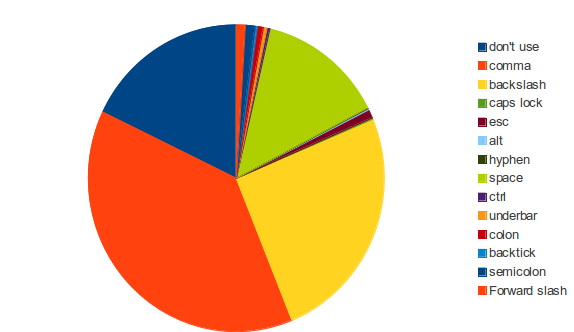
<p>I&rsquo;ve always just stuck with the default, althought I was aware that alot of people use &lsquo;,&rsquo;.
Using space was new to me, but according to this it&rsquo;s one of the most popular keys</p>

<p><img src="http://mattyw.github.io/images/leader.png"></p>

<p>comma 470 36%</p>

<p>backslash 309 23.7</p>

<p>none/ don&rsquo;t use, never heard of leader 220 17%</p>

<p>space 169 13%</p>

<p>semicolon 13 1%</p>

<p>forward slash 12 0.9%</p>

<p>esc 11 0.8%</p>

<p>colon 8</p>

<p>underbar 5</p>

<p>ctrl 4</p>

<p>alt/ caps lock 2</p>

<h3>How often do you make changes to your vimrc file?</h3>

<p>montly 603 46%</p>

<p>weekly 459 35%</p>

<p>yearly 138 10%</p>

<p>daily 60 4%</p>

<p>no customisations 21 1%</p>

<h3>When did you first use vim?</h3>

<p>2010&rsquo;s 613 47%</p>

<p>2000&rsquo;s 505 38%</p>

<p>1990&rsquo;s 162 12%</p>

<h3>How many plugins do you have installed at the moment?</h3>

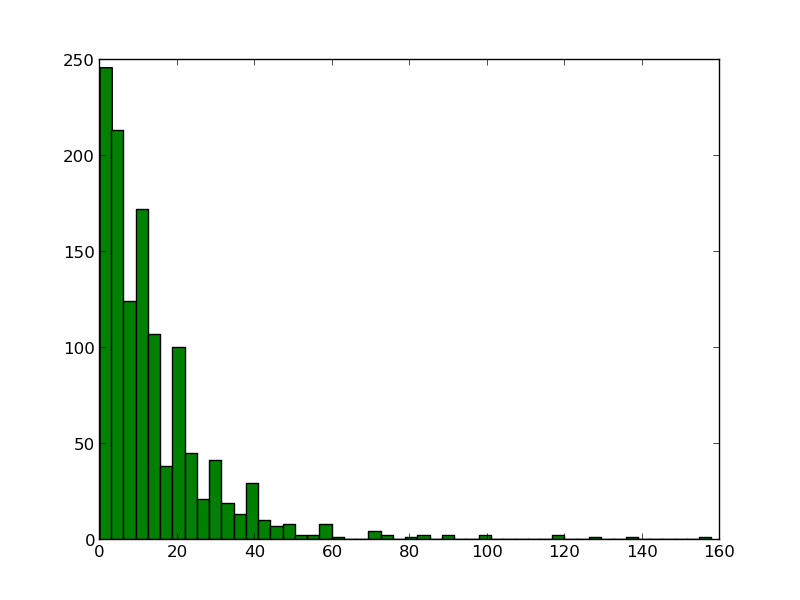
<p>This is the question I really wanted answered.
Thankfully it seems like most of us would rather have less plugins
<img src="http://mattyw.github.io/images/plugins.png"></p>

<h3>Your favourite plugin?</h3>

<p>ctrlp 171 13%</p>

<p>syntastic 59 4%</p>

<p>nerdtree 59 4%</p>

<p>youcompleteme 50 3%</p>

<p>fugitive 41 3%</p>

<p>airline 39 3%</p>

<p>surround 30 2%</p>

<p>vundle 30 2%</p>

<p>pathogen 24 1%</p>

<h3>Do you remove plugins you no longer user?</h3>

<p>yes 1009 77%</p>

<p>no 229 17%</p>

<h3>What is your average typing speed?</h3>

<p>61  &ndash; 80 391 30%</p>

<p>41 &ndash; 60 360 27%</p>

<p>> 80 344 26%</p>

<p>20 &ndash; 40 wpm 121 9%</p>

<p>&lt; 20 wpm 8 1%</p>

<h3>Roughly how many different computers will you use in a particular week?</h3>

<p>6 &ndash; 10 143 11%</p>

<p>2 &ndash; 5 877 67%</p>

<p>> 10 122 9%</p>

<p>1 132 10%</p>

<h3>Have you written a plugin?</h3>

<p>no 1006 77%</p>

<p>yes &ndash; publicly available  121 9%</p>

<p>yes &ndash; kept it private 148 11%</p>

<h3>Give me a single piece of advice</h3>

<p>Some of it is great, some is crazy, you&rsquo;re welcome to take a look at the raw results:</p>

<p><a href="https://docs.google.com/document/d/1cUmvNqsWgkqEEOvX5K7RMxuEvu1EZTtOKo0V1YDXguw/edit">It&rsquo;s all here</a></p>

<h3>Your view of emacs?</h3>

<p>never used emacs &ndash; don&rsquo;t want to 498 38%</p>

<p>never used emacs &ndash; but willing to try 418 32%</p>

<p>i use it every now and again 221 17%</p>

<p>it&rsquo;s another tool in my toolbox 113 8%</p>

<p>I spent a while trying to work out how to construct this question, what I was trying to work out is if the editor war really existed, I don&rsquo;t use emacs, but I did, and there are some things I think it does better than vim, and some things it doesn&rsquo;t.
I spent ~2 years using emacs before moving to vim, I wanted to get a broad idea of how emacs is view by the vim community. The results were a suprise</p>

<h1>That&rsquo;s it</h1>

<p>That&rsquo;s all there is nothing more. I&rsquo;m not great with statistics so I encourage others to take a look at the raw data and come up with a much better &lsquo;analysis&rsquo;.
If anyone feels that the above is in some way worthy of a small tip here&rsquo;s my btc address:</p>

<p>1CQJ4VkFgV45NnwETRZnHsbZq6djN9YRGH</p>
]]></content>
  </entry>
  
  <entry>
    <title type="html"><![CDATA[Go playground as a service]]></title>
    <link href="http://mattyw.github.io/blog/2013/10/30/go-playground-as-a-service/"/>
    <updated>2013-10-30T13:08:00+00:00</updated>
    <id>http://mattyw.github.io/blog/2013/10/30/go-playground-as-a-service</id>
    <content type="html"><![CDATA[<p><strong><em>Update</em></strong>: So I&rsquo;ve learned that there&rsquo;s actually some work to be done here around sandboxing before it&rsquo;s actually ready for public use. Until then I&rsquo;ve removed the server, but the code is still available if you want to play around with it in a trusted setting.</p>

<p>One of the great things about go is the whole environment you get with it, gofmt, godoc, go get. It&rsquo;s all good stuff.
There&rsquo;s also a <a href="http://play.golang.org">playground</a> for you to try things out on.
The docs also have runnable examples in them based off a similar idea:
<a href="http://golang.org/pkg/encoding/json/#example_Unmarshal">http://golang.org/pkg/encoding/json/#example_Unmarshal</a></p>

<p>It&rsquo;s a great idea, it means you can actually try the code out while you&rsquo;re reading the docs. But it only works on code from the stdlib. But that makes sense doesn&rsquo;t it? You don&rsquo;t want to allow anyone to import some arbitrary package.</p>

<p>But it occured to me that when someone develops a package, the author might want to include runnable examples for their own code.</p>

<p>The source for something similar to the playgrond is incuded in the go release (misc/goplay) I&rsquo;ve modified it very slightly to allow /compile to be called from any location.
I&rsquo;ve called it <a href="http://github.com/mattyw/goplaas">goplaas</a> (It&rsquo;s not really as a service, but that&rsquo;s the standard suffix these days isn&#8217; it? And it got your attention!)</p>

<p>The idea is you install it on your own server, and it will have access to anything installed on your GOPATH. This means you can control what packages can be imported, and also the version.</p>

<p>All you need to do is put some javascript and a textarea into a webpage, point it to your server and you&rsquo;re done.</p>

<p>Here&rsquo;s an example using the loggo package from launchpad.net. Try it</p>

<figure class='code'><div class="highlight"><table><tr><td class="gutter"><pre class="line-numbers"><span class='line-number'>1</span>
</pre></td><td class='code'><pre><code class=''><span class='line'>I've removed it - sorry</span></code></pre></td></tr></table></div></figure>


<p>I&rsquo;ll try to keep my server running with goplaas for the next few weeks. If it suddenly stops working, it&rsquo;s likely that I&rsquo;ve pulled the server down. You can experiment yourself by running</p>

<figure class='code'><figcaption><span></span></figcaption><div class="highlight"><table><tr><td class="gutter"><pre class="line-numbers"><span class='line-number'>1</span>
<span class='line-number'>2</span>
</pre></td><td class='code'><pre><code class='bash'><span class='line'>go install github.com/mattyw/goplaas
</span><span class='line'>./goplaas -http :9999 <span class="c">#Listen on 9999</span>
</span></code></pre></td></tr></table></div></figure>


<p>goplaas includes a -compile flag for sending compilation instructions to another server, full instructions are in github.</p>

<p>A good next step would be to package this all up into a docker container to allow anyone to install it with relative ease</p>
]]></content>
  </entry>
  
  <entry>
    <title type="html"><![CDATA[Clojure programming in acme]]></title>
    <link href="http://mattyw.github.io/blog/2013/10/17/clojure-programming-in-acme/"/>
    <updated>2013-10-17T14:04:00+01:00</updated>
    <id>http://mattyw.github.io/blog/2013/10/17/clojure-programming-in-acme</id>
    <content type="html"><![CDATA[<p>Today I finally got round to trying out something i&rsquo;d been meaning to look into for nearly a year, and seeing as clojure and editors seems to be a topic again I thought it would help add some diversity.</p>

<p>Acme is an editor unlike any other. It was designed by Rob Pike for Plan9 (although it&rsquo;s available for unix-like systems using <a href="http://swtch.com/plan9port/">Plan9 from User Space</a>).
It&rsquo;s designed to be an editor and shell. Unlike emacs and vim which encourage you to keep your hands on the keyboard, acme requires use of a 3-button mouse, and it supports something called mouse chording. A rough guide would be:</p>

<ul>
<li>Button 1: Select Text</li>
<li>Button 2: Execute Command</li>
<li>Button 3: Search/ acquire text (or load file)</li>
<li>Button 1-2 Cutting</li>
<li>Button 1-3 Pasting</li>
<li>Button 1-2,3 Cut+Paste (Copy)</li>
</ul>


<p>My introduction to acme was via Russ Cox&#8217; video, which is a great starting point:</p>

<iframe width="560" height="315" src="http://mattyw.github.io//www.youtube.com/embed/dP1xVpMPn8M" frameborder="0" allowfullscreen></iframe>


<p>You can probably summarise the whole thing by saying that in acme &ndash; text is data. Once you type some text, it can be saved into a file, executed as a command or passed as an argument to a command.</p>

<p>Obviously this resonated with the clojure part of my brain. It occured to me that being able to select some clojure code in acme and evaluate it would make acme a great editor for clojure.</p>

<p>Thanks to nrepl the job is really quite easy. I wrote a very <em>very</em> simple nrepl client in go. You can find it on my <a href="https://github.com/mattyw/gonrepl">github</a></p>

<p>All it does is read clojure code from stdin and send it to nrepl. This is really all there is to do. In acme you just need to type your command in one of the scratch areas:</p>

<p>Take a look at the below screenshot. You can see:</p>

<ol>
<li>In yellow: selected clojure code with mouse button 1</li>
<li>In red: selected command with mouse button two</li>
<li>Release the buttons and the window in the bottom right contains the evalutated code</li>
</ol>


<p><a href="http://imgur.com/NoEHuqV"><img src="http://i.imgur.com/NoEHuqV.png" title="Hosted by imgur.com" /></a></p>

<p>Here&rsquo;s a video of me doing it:</p>

<iframe src="http://mattyw.github.io//player.vimeo.com/video/77128688" width="500" height="345" frameborder="0" webkitallowfullscreen mozallowfullscreen allowfullscreen></iframe>


<p> <p><a href="http://vimeo.com/77128688">Clojure in Acme</a> from <a href="http://vimeo.com/user5806599">Matthew Williams</a> on <a href="https://vimeo.com">Vimeo</a>.</p></p>

<p>To get this setup yourself:</p>

<ol>
<li>Install plan9 from user space to get acme</li>
<li>run lein repl in some terminal</li>
<li>You&rsquo;ll need a command line tool that can take clojure code on stdin and send it to nrepl. I used my own gonrepl tool- To use that you need to install go then run:</li>
</ol>


<figure class='code'><figcaption><span></span></figcaption><div class="highlight"><table><tr><td class="gutter"><pre class="line-numbers"><span class='line-number'>1</span>
</pre></td><td class='code'><pre><code class='bash'><span class='line'>go install github.com/mattyw/gonrepl/...
</span></code></pre></td></tr></table></div></figure>


<p>That&rsquo;s it. Thanks for reading!</p>
]]></content>
  </entry>
  
  <entry>
    <title type="html"><![CDATA[Why Juju means I don't need a VPS]]></title>
    <link href="http://mattyw.github.io/blog/2013/08/16/why-juju-means-i-dont-need-a-vps/"/>
    <updated>2013-08-16T13:45:00+01:00</updated>
    <id>http://mattyw.github.io/blog/2013/08/16/why-juju-means-i-dont-need-a-vps</id>
    <content type="html"><![CDATA[<p>tl;dr: <a href="http://juju.ubuntu.com">Juju</a> is aimed at deploying and scaling hundreds of services. But it&rsquo;s also a handy alternative to buying a VPS.</p>

<p>I don&rsquo;t have a VPS, I have in the past but I&rsquo;ve never used them enough for me to be able to justify the cost long term.
Juju provides a perfect solution to this use case.</p>

<p>I have a very simple charm I call <a href="https://github.com/mattyw/charm_collection/tree/master/charms/precise/devenv">devenv</a>, it doesn&rsquo;t do much more than install stuff I use for doing development, like installing tmux and grabbing my configuration files. I&rsquo;ve blogged about it previously <a href="http://mattyjwilliams.blogspot.co.uk/2013/05/deploying-development-machine-with-juju.html">here</a>.</p>

<p>This week I was having trouble getting a client library to connect to a simple server program I&rsquo;d written, I was lost with debugging but luckily the library author volunteered to help me out.
I already had a binary of the server that could be used to generate the error in the client library, but I don&rsquo;t have a VPS, so what&rsquo;s the quickest way for me to make the server public so the library author can play around with it?</p>

<p><a href="http://juju.ubuntu.com">Juju!</a></p>

<p>All I needed to do was to add the following line to the start hook of my devenv charm:</p>

<figure class='code'><figcaption><span></span></figcaption><div class="highlight"><table><tr><td class="gutter"><pre class="line-numbers"><span class='line-number'>1</span>
</pre></td><td class='code'><pre><code class='bash'><span class='line'>./app &amp;
</span></code></pre></td></tr></table></div></figure>


<p>And copy the app binary to my charm directory.</p>

<p>It&rsquo;s sort of an anti pattern &ndash; but because juju copies the whole charm dir when it deploys, it will grab any binaries in the charm dir as well, it&rsquo;s not a great idea to make use of this for serious deployments, but for me it was great</p>

<p>With that done all I had to do was deploy it:</p>

<figure class='code'><figcaption><span></span></figcaption><div class="highlight"><table><tr><td class="gutter"><pre class="line-numbers"><span class='line-number'>1</span>
<span class='line-number'>2</span>
</pre></td><td class='code'><pre><code class='bash'><span class='line'>juju bootstrap
</span><span class='line'>juju deploy --repository<span class="o">=</span>charms <span class="nb">local</span>:precise/devenv
</span></code></pre></td></tr></table></div></figure>


<p>From deciding I wanted to deploy the binary &ndash; to having it deployed was under 5 minutes. 20 minutes later the library was fixed and the server was taken down</p>

<figure class='code'><figcaption><span></span></figcaption><div class="highlight"><table><tr><td class="gutter"><pre class="line-numbers"><span class='line-number'>1</span>
</pre></td><td class='code'><pre><code class='bash'><span class='line'>juju destroy-environment
</span></code></pre></td></tr></table></div></figure>


<p>That was it. All in all it cost around $0.02 (that&rsquo;s just over 1p). Much better than having a VPS that would largely sit idle.</p>

<p>Of course the other advantage with using juju is that I&rsquo;m not tied to a particular cloud provider, so I can choose which one I want depending on the pricing at that moment. And since juju now supports local mode you can do your charm development offline to save even more money!</p>

<p><strong>Great, how does this help me?</strong></p>

<p>If you&rsquo;re thinking of getting a VPS &ndash; but don&rsquo;t feel you can justify the cost because of the amount of use you&rsquo;d get out of it, then you really should try out juju. Once you&rsquo;ve got it installed there&rsquo;s a handy charm that just deploys ubuntu server, it&rsquo;s a great starting point for writing a charm to setup your own development environment.</p>

<figure class='code'><figcaption><span></span></figcaption><div class="highlight"><table><tr><td class="gutter"><pre class="line-numbers"><span class='line-number'>1</span>
</pre></td><td class='code'><pre><code class='bash'><span class='line'>juju deploy ubuntu
</span></code></pre></td></tr></table></div></figure>


<p></p>

<p>Here&rsquo;s another link to my post about writing a charm to build a development machine: <a href="http://mattyjwilliams.blogspot.co.uk/2013/05/deploying-development-machine-with-juju.html">http://mattyjwilliams.blogspot.co.uk/2013/05/deploying-development-machine-with-juju.html</a></p>
]]></content>
  </entry>
  
  <entry>
    <title type="html"><![CDATA[simple macros in clojure and elixir]]></title>
    <link href="http://mattyw.github.io/blog/2013/08/13/simple-macros-in-clojure-and-elixir/"/>
    <updated>2013-08-13T17:34:00+01:00</updated>
    <id>http://mattyw.github.io/blog/2013/08/13/simple-macros-in-clojure-and-elixir</id>
    <content type="html"><![CDATA[<p>Don&rsquo;t write macros is a pretty good rule, but when you&rsquo;re learning a language it&rsquo;s quite a fun little exercise.
One such exercise I like to try is this:</p>

<p><strong>Write a function so that I can call system commands without having to wrap them in quotes.</strong></p>

<p>So rather than doing this:</p>

<p>cmd([&ldquo;grep&rdquo;, &ldquo;-rin&rdquo;, &ldquo;foo&rdquo;, &ldquo;./&rdquo;])</p>

<p>I can do this:</p>

<p>cmd([grep, -rin, foo, ./])</p>

<h3>Clojure</h3>

<p>In lisps like clojure, the solution is very elegant, thanks to the minimal syntax, you end up with something like:</p>

<figure class='code'><figcaption><span></span></figcaption><div class="highlight"><table><tr><td class="gutter"><pre class="line-numbers"><span class='line-number'>1</span>
</pre></td><td class='code'><pre><code class='clojure'><span class='line'><span class="p">(</span><span class="nf">call</span> <span class="nv">grep</span> <span class="nv">-rin</span> <span class="nv">foo</span> <span class="s">&quot;./&quot;</span><span class="p">)</span>
</span></code></pre></td></tr></table></div></figure>


<p>And the macro to do it is also pretty elegant:</p>

<figure class='code'><figcaption><span></span></figcaption><div class="highlight"><table><tr><td class="gutter"><pre class="line-numbers"><span class='line-number'>1</span>
<span class='line-number'>2</span>
<span class='line-number'>3</span>
</pre></td><td class='code'><pre><code class='clojure'><span class='line'><span class="p">(</span><span class="kd">defmacro </span><span class="nv">mcall</span> <span class="p">[</span><span class="o">&amp;</span> <span class="nv">args</span><span class="p">]</span>
</span><span class='line'>  <span class="p">(</span><span class="k">let </span><span class="p">[</span><span class="nv">sym</span> <span class="p">(</span><span class="nf">gensym</span><span class="p">)]</span>
</span><span class='line'>  <span class="o">`</span><span class="p">(</span><span class="nb">apply </span><span class="nv">sh</span> <span class="p">(</span><span class="nb">map str </span><span class="o">&#39;~</span><span class="nv">args</span><span class="p">))))</span>
</span></code></pre></td></tr></table></div></figure>


<p>Not too much magic (as far as macros are concerned) here. Make a unique symbol with (gensysm) to keep our macro hygienic.
We syntax quote our whole list using ` to not evaluate anything unless we say so. That means we have to do some magic with our args parameter: &lsquo;~args. ~ here means
evaluate args (so we get the symbols we passed in) but then we quote with &rsquo; so that we don&rsquo;t evaluate these symbols. That&rsquo;s the magic that lets us not need quotes around our arguments.
The rest of the code just puts them in the right place by mapping our args list against the str function and applying it to sh.
This is how you use it:</p>

<figure class='code'><figcaption><span></span></figcaption><div class="highlight"><table><tr><td class="gutter"><pre class="line-numbers"><span class='line-number'>1</span>
<span class='line-number'>2</span>
</pre></td><td class='code'><pre><code class='clojure'><span class='line'><span class="p">(</span><span class="nb">prn </span><span class="p">(</span><span class="nf">mcall</span> <span class="nv">ls</span> <span class="nv">-l</span><span class="p">))</span>
</span><span class='line'><span class="p">(</span><span class="nb">prn </span><span class="p">(</span><span class="nf">mcall</span> <span class="nv">grep</span> <span class="nv">-rin</span> <span class="nb">not </span><span class="s">&quot;./&quot;</span><span class="p">))</span> <span class="c1">; We still need quotes around ./ because it&#39;s not valid syntax</span>
</span></code></pre></td></tr></table></div></figure>


<p>By coincidence I blogged about clojure macros almost exactly one year ago: <a href="http://mattyjwilliams.blogspot.co.uk/2012/08/another-clojure-macro-tutorial-that-no.html">http://mattyjwilliams.blogspot.co.uk/2012/08/another-clojure-macro-tutorial-that-no.html</a></p>

<h3>Elixir</h3>

<p>Elixir is a lovely little language I&rsquo;ve been playing with recently, so naturally I wanted to try out the macros.
I needed to ask a few questions on the irc channel (thanks ericmj and true_droid!), but I got it cracked:</p>

<figure class='code'><figcaption><span></span></figcaption><div class="highlight"><table><tr><td class="gutter"><pre class="line-numbers"><span class='line-number'>1</span>
<span class='line-number'>2</span>
<span class='line-number'>3</span>
<span class='line-number'>4</span>
<span class='line-number'>5</span>
<span class='line-number'>6</span>
</pre></td><td class='code'><pre><code class='elixir'><span class='line'><span class="k">defmacro</span> <span class="n">mcall</span><span class="p">(</span><span class="n">args</span><span class="p">)</span> <span class="k">do</span>
</span><span class='line'><span class="k">    </span><span class="n">call</span> <span class="o">=</span> <span class="no">Enum</span><span class="o">.</span><span class="n">map_join</span><span class="p">(</span><span class="n">args</span><span class="p">,</span> <span class="s2">&quot; &quot;</span><span class="p">,</span> <span class="no">Macro</span><span class="o">.</span><span class="n">to_string</span><span class="p">(</span><span class="nv">&amp;1</span><span class="p">))</span>
</span><span class='line'>    <span class="kn">quote</span> <span class="k">do</span>
</span><span class='line'><span class="k">      </span><span class="no">System</span><span class="o">.</span><span class="n">cmd</span><span class="p">(</span><span class="kn">unquote</span><span class="p">(</span><span class="n">call</span><span class="p">))</span>
</span><span class='line'>    <span class="k">end</span>
</span><span class='line'><span class="k">end</span>
</span></code></pre></td></tr></table></div></figure>


<p>Again, not much magic, map_join maps our list using the Macro.to_string function then joins at the end, this is done outside of the quote since we will work it out at compile time.
We then pass this to System.cmd in a quote block &ndash; which means don&rsquo;t evaluate this yet, that will happen when we call mcall at runtime.</p>

<figure class='code'><figcaption><span></span></figcaption><div class="highlight"><table><tr><td class="gutter"><pre class="line-numbers"><span class='line-number'>1</span>
<span class='line-number'>2</span>
</pre></td><td class='code'><pre><code class='elixir'><span class='line'><span class="no">IO</span><span class="o">.</span><span class="n">inspect</span> <span class="no">MacroTest</span><span class="o">.</span><span class="n">mcall</span><span class="p">([</span><span class="n">ls</span><span class="p">,</span> <span class="o">-</span><span class="n">l</span><span class="p">])</span>
</span><span class='line'><span class="no">IO</span><span class="o">.</span><span class="n">inspect</span> <span class="no">MacroTest</span><span class="o">.</span><span class="n">mcall</span><span class="p">([</span><span class="n">grep</span><span class="p">,</span> <span class="o">-</span><span class="n">rin</span><span class="p">,</span> <span class="k">def</span><span class="p">,</span> <span class="s2">&quot;./&quot;</span><span class="p">])</span> <span class="c1"># We still need quotes around ./ because it&#39;s not valid syntax</span>
</span></code></pre></td></tr></table></div></figure>

]]></content>
  </entry>
  
  <entry>
    <title type="html"><![CDATA[Taming the cloud with juju and raspberry pi]]></title>
    <link href="http://mattyw.github.io/blog/2013/06/27/taming-the-cloud-with-juju-and-raspberry-pi/"/>
    <updated>2013-06-27T08:01:00+01:00</updated>
    <id>http://mattyw.github.io/blog/2013/06/27/taming-the-cloud-with-juju-and-raspberry-pi</id>
    <content type="html"><![CDATA[<h2>The idea</h2>

<p>We&rsquo;re going to use a raspberry pi and juju to setup a wordpress blog on aws.</p>

<p>The raspberry pi is an amazing little gadget. Low power enough that I don&rsquo;t feel guilty about leaving it turned on overnight, but flexible enough that I can shove leds into it to grab my attention if needed.</p>

<p><a href="http://juju.ubuntu.com">Juju</a> is ubuntu&rsquo;s answer to setting up services in the cloud. Once installed you simply setup your credentials with an existing cloud provider like aws or hp cloud and then deploy things into it. Setting up wordpress for example is as simple as</p>

<figure class='code'><figcaption><span></span></figcaption><div class="highlight"><table><tr><td class="gutter"><pre class="line-numbers"><span class='line-number'>1</span>
<span class='line-number'>2</span>
<span class='line-number'>3</span>
<span class='line-number'>4</span>
<span class='line-number'>5</span>
</pre></td><td class='code'><pre><code class='bash'><span class='line'>juju bootstrap <span class="c"># Setup the cloud environment</span>
</span><span class='line'>juju deploy wordpress <span class="c"># Start an instance and install wordpress on it</span>
</span><span class='line'>juju deploy mysql <span class="c"># Start an instance and install mysql on it</span>
</span><span class='line'>juju add-relation wordpress mysql <span class="c"># Connect wordpress and mysql together</span>
</span><span class='line'>juju expose wordpress <span class="c">#Allow wordpress to be accessed from a public ip</span>
</span></code></pre></td></tr></table></div></figure>


<h2>The Plan</h2>

<ol>
<li>Install go onto the raspberry pi</li>
<li>Install juju</li>
<li>Deploy a wordpress blog</li>
</ol>


<p>We&rsquo;re going to be installing the latest version of juju which is written in go.</p>

<h2>Installing Go</h2>

<p>Dave Cheney has written an excellent article on <a href="http://dave.cheney.net/2012/09/25/installing-go-on-the-raspberry-pi">Installing go on the raspberry pi</a>. On my model B (1.0 revision) I had to update raspi-config so that I could select the 240M/16M memory split, but you might have to see how you get on here. I choose to skip the tests and just ran ./make.bash to build go rather than all.bash.</p>

<p>I was unable to build juju using go 1.0.3. I ended up building go 1.1.1 from source, which seemed to work fine. From memory I believe you need to setup a folder to be your GOPATH before you can install the latest version of go.</p>

<h2>Installing Juju</h2>

<p>Getting the latest tip of juju-core is easy using the go get command, it grabs all the dependencies for you, it does mean we&rsquo;re grabbing tip, but there are ways to fix that later if we need to. juju-core is hosted on launchpad.net which uses bazaar for source control. This means you need to install it before you can run go get. I was able to install it on raspian using</p>

<figure class='code'><figcaption><span></span></figcaption><div class="highlight"><table><tr><td class="gutter"><pre class="line-numbers"><span class='line-number'>1</span>
<span class='line-number'>2</span>
</pre></td><td class='code'><pre><code class='bash'><span class='line'>sudo apt-get update
</span><span class='line'>sudo apt-get bzr
</span></code></pre></td></tr></table></div></figure>


<p>Without doing the update I was unable to grab all of bzr&rsquo;s dependencies, so I recommend running the update first.</p>

<p>Once bzr is installed you can install juju using go get:</p>

<figure class='code'><figcaption><span></span></figcaption><div class="highlight"><table><tr><td class="gutter"><pre class="line-numbers"><span class='line-number'>1</span>
<span class='line-number'>2</span>
</pre></td><td class='code'><pre><code class='bash'><span class='line'>sudo apt-get install libcurl4-gnutls-dev
</span><span class='line'>go get launchpad.net/juju-core/...
</span></code></pre></td></tr></table></div></figure>


<p>When it&rsquo;s finished you should find a juju binary installed. Mine ended up in my GOPATH, I think because I had something setup wrong somewhere. But if you&rsquo;ve got this far I&rsquo;m sure you&rsquo;ll be able to find it.</p>

<h2>Setting up Juju</h2>

<p>There&rsquo;s much better instructions for setting up juju <a href="https://juju.ubuntu.com/get-started/">here</a> The basic steps come down to</p>

<ol>
<li>Setting up a public key</li>
<li>Generating an environments.yaml file</li>
<li>Filling the file in with the data for your cloud provider</li>
</ol>


<p>I configured juju for aws. My ~/.juju/environments.yaml file looked like this:</p>

<figure class='code'><figcaption><span></span></figcaption><div class="highlight"><table><tr><td class="gutter"><pre class="line-numbers"><span class='line-number'>1</span>
<span class='line-number'>2</span>
<span class='line-number'>3</span>
<span class='line-number'>4</span>
<span class='line-number'>5</span>
<span class='line-number'>6</span>
<span class='line-number'>7</span>
<span class='line-number'>8</span>
</pre></td><td class='code'><pre><code class='yaml'><span class='line'><span class="l-Scalar-Plain">default</span><span class="p-Indicator">:</span> <span class="l-Scalar-Plain">amazon</span>
</span><span class='line'><span class="l-Scalar-Plain">environments</span><span class="p-Indicator">:</span>
</span><span class='line'>  <span class="l-Scalar-Plain">amazon</span><span class="p-Indicator">:</span>
</span><span class='line'>    <span class="l-Scalar-Plain">type</span><span class="p-Indicator">:</span> <span class="l-Scalar-Plain">ec2</span>
</span><span class='line'>      <span class="l-Scalar-Plain">access-key</span><span class="p-Indicator">:</span> <span class="l-Scalar-Plain">MY AWS ACCESS KEY</span>
</span><span class='line'>      <span class="l-Scalar-Plain">secret-key</span><span class="p-Indicator">:</span> <span class="l-Scalar-Plain">MY AWS SECRET KEY</span>
</span><span class='line'>      <span class="l-Scalar-Plain">control-bucket</span><span class="p-Indicator">:</span> <span class="l-Scalar-Plain">mattyw-ec2-bucket</span>
</span><span class='line'>      <span class="l-Scalar-Plain">admin-secret</span><span class="p-Indicator">:</span> <span class="l-Scalar-Plain">mattyw-ec2-admin</span>
</span></code></pre></td></tr></table></div></figure>


<p>Once you&rsquo;ve done this, try running <strong>juju bootstrap</strong>. If it finishes without error wait a minute or so and run <strong>juju status</strong>, If all goes well you should see something like this</p>

<figure class='code'><figcaption><span></span></figcaption><div class="highlight"><table><tr><td class="gutter"><pre class="line-numbers"><span class='line-number'>1</span>
<span class='line-number'>2</span>
<span class='line-number'>3</span>
<span class='line-number'>4</span>
<span class='line-number'>5</span>
<span class='line-number'>6</span>
<span class='line-number'>7</span>
<span class='line-number'>8</span>
<span class='line-number'>9</span>
</pre></td><td class='code'><pre><code class='yaml'><span class='line'><span class="l-Scalar-Plain">$ juju status</span>
</span><span class='line'><span class="l-Scalar-Plain">machines</span><span class="p-Indicator">:</span>
</span><span class='line'>  <span class="s">&quot;0&quot;</span><span class="p-Indicator">:</span>
</span><span class='line'>    <span class="l-Scalar-Plain">agent-state</span><span class="p-Indicator">:</span> <span class="l-Scalar-Plain">started</span>
</span><span class='line'>    <span class="l-Scalar-Plain">agent-version</span><span class="p-Indicator">:</span> <span class="l-Scalar-Plain">1.11.0</span>
</span><span class='line'>    <span class="l-Scalar-Plain">dns-name</span><span class="p-Indicator">:</span> <span class="l-Scalar-Plain">ec2-23-20-228-111.compute-1.amazonaws.com</span>
</span><span class='line'>    <span class="l-Scalar-Plain">instance-id</span><span class="p-Indicator">:</span> <span class="l-Scalar-Plain">i-0bfc3d64</span>
</span><span class='line'>    <span class="l-Scalar-Plain">series</span><span class="p-Indicator">:</span> <span class="l-Scalar-Plain">precise</span>
</span><span class='line'><span class="l-Scalar-Plain">services</span><span class="p-Indicator">:</span> <span class="p-Indicator">{}</span>
</span></code></pre></td></tr></table></div></figure>


<p>Now we can start the business of getting a blog up and running:</p>

<figure class='code'><figcaption><span></span></figcaption><div class="highlight"><table><tr><td class="gutter"><pre class="line-numbers"><span class='line-number'>1</span>
<span class='line-number'>2</span>
<span class='line-number'>3</span>
<span class='line-number'>4</span>
</pre></td><td class='code'><pre><code class='bash'><span class='line'>juju deploy wordpress
</span><span class='line'>juju deploy mysql
</span><span class='line'>juju add-relation wordpress mysql
</span><span class='line'>juju expose wordpress
</span></code></pre></td></tr></table></div></figure>


<p>You might have to wait a few minutes for everything to start up, keep taking a look at the output of <strong>juju status</strong> until you see all the agent-states running and expose true on wordpress.</p>

<p>When it&rsquo;s done you should see something like this in your juju status output:</p>

<figure class='code'><figcaption><span></span></figcaption><div class="highlight"><table><tr><td class="gutter"><pre class="line-numbers"><span class='line-number'>1</span>
<span class='line-number'>2</span>
<span class='line-number'>3</span>
<span class='line-number'>4</span>
<span class='line-number'>5</span>
<span class='line-number'>6</span>
<span class='line-number'>7</span>
<span class='line-number'>8</span>
<span class='line-number'>9</span>
<span class='line-number'>10</span>
<span class='line-number'>11</span>
<span class='line-number'>12</span>
<span class='line-number'>13</span>
<span class='line-number'>14</span>
</pre></td><td class='code'><pre><code class='yaml'><span class='line'> <span class="l-Scalar-Plain">wordpress</span><span class="p-Indicator">:</span>
</span><span class='line'>    <span class="l-Scalar-Plain">charm</span><span class="p-Indicator">:</span> <span class="l-Scalar-Plain">cs:precise/wordpress-15</span>
</span><span class='line'>    <span class="l-Scalar-Plain">exposed</span><span class="p-Indicator">:</span> <span class="l-Scalar-Plain">true</span>
</span><span class='line'>    <span class="l-Scalar-Plain">relations</span><span class="p-Indicator">:</span>
</span><span class='line'>      <span class="l-Scalar-Plain">db</span><span class="p-Indicator">:</span>
</span><span class='line'>      <span class="p-Indicator">-</span> <span class="l-Scalar-Plain">mysql</span>
</span><span class='line'>      <span class="l-Scalar-Plain">loadbalancer</span><span class="p-Indicator">:</span>
</span><span class='line'>      <span class="p-Indicator">-</span> <span class="l-Scalar-Plain">wordpress</span>
</span><span class='line'>    <span class="l-Scalar-Plain">units</span><span class="p-Indicator">:</span>
</span><span class='line'>      <span class="l-Scalar-Plain">wordpress/0</span><span class="p-Indicator">:</span>
</span><span class='line'>        <span class="l-Scalar-Plain">agent-state</span><span class="p-Indicator">:</span> <span class="l-Scalar-Plain">started</span>
</span><span class='line'>        <span class="l-Scalar-Plain">agent-version</span><span class="p-Indicator">:</span> <span class="l-Scalar-Plain">1.11.0</span>
</span><span class='line'>        <span class="l-Scalar-Plain">machine</span><span class="p-Indicator">:</span> <span class="s">&quot;1&quot;</span>
</span><span class='line'>        <span class="l-Scalar-Plain">public-address</span><span class="p-Indicator">:</span> <span class="l-Scalar-Plain">ec2-54-234-76-38.compute-1.amazonaws.com</span>
</span></code></pre></td></tr></table></div></figure>


<p>Now point your web browser to the url in public-address and there you go, you&rsquo;re deploying stuff from your pi.</p>

<p>Juju doesn&rsquo;t stop at just deploying blogs. Check out <a href="http://juju.ubuntu.com">Juju</a> to see what else it can do for you</p>
]]></content>
  </entry>
  
  <entry>
    <title type="html"><![CDATA[why I like elixir (and other go programmers might too)]]></title>
    <link href="http://mattyw.github.io/blog/2013/06/17/why-i-like-elixir/"/>
    <updated>2013-06-17T21:10:00+01:00</updated>
    <id>http://mattyw.github.io/blog/2013/06/17/why-i-like-elixir</id>
    <content type="html"><![CDATA[<h2>My journey to elixir</h2>

<p>Erlang was the first functional language I ever used. When I first started reading <a href="http://pragprog.com/book/jaerlang/programming-erlang">Programming Erlang</a> by Joe Armstrong I was hooked, I was fascinated in a language where &ldquo;=&rdquo; didn&rsquo;t indicate an assignment, and the idea of pattern matching immediately struck a chord with me, I loved the one module per &lsquo;process&rsquo; thing. Erlang was set to become my favourite language, there was only one problem.</p>

<p>I didn&rsquo;t like the syntax</p>

<p>It&rsquo;s a completely personal view, I know people who love the syntax, I just didn&rsquo;t. To me it just didn&rsquo;t have what Christopher Alexander in &ldquo;The Timeless way of building&rdquo; calls &ldquo;quality without a name&rdquo;. I suppose I just didn&rsquo;t find it fun to type. So after re writing a couple of internal libraries in erlang to see what they looked like (they were much shorter and quite easy to read) I stopped using it, and started playing around with other languages like haskell and clojure.</p>

<p>Clojure was my first lisp dialect and I enjoy it alot, the syntax, the whole homoiconicity thing, macro&rsquo;s aren&rsquo;t something you should use all the time &ndash; but it&rsquo;s comforting to know they&rsquo;re there to fall back on if you need them.</p>

<p>Parallel to this functional language experimentation was another path &ndash; languages I used at work, which has seen me recently move from writing mostly in Python to Go. Go&rsquo;s channels and go routines are great, but when I started writing go code seriously (about 8 months ago) there was something that immediately stuck me.</p>

<figure class='code'><figcaption><span></span></figcaption><div class="highlight"><table><tr><td class="gutter"><pre class="line-numbers"><span class='line-number'>1</span>
<span class='line-number'>2</span>
<span class='line-number'>3</span>
<span class='line-number'>4</span>
</pre></td><td class='code'><pre><code class='go'><span class='line'><span class="nx">thing</span><span class="p">,</span> <span class="nx">err</span> <span class="o">:=</span> <span class="nx">someFunction</span><span class="p">()</span>
</span><span class='line'><span class="k">if</span> <span class="nx">err</span> <span class="o">!=</span> <span class="kc">nil</span> <span class="p">{</span>
</span><span class='line'>    <span class="c1">//handle the error</span>
</span><span class='line'><span class="p">}</span>
</span></code></pre></td></tr></table></div></figure>


<p>Now, I&rsquo;m not going to start complaining about go&rsquo;s error handling, because I like it. But sometimes I would like to be able to make use of pattern matching and do something like this:</p>

<figure class='code'><figcaption><span></span></figcaption><div class="highlight"><table><tr><td class="gutter"><pre class="line-numbers"><span class='line-number'>1</span>
</pre></td><td class='code'><pre><code class='go'><span class='line'><span class="p">{</span><span class="nx">thing</span><span class="p">,</span> <span class="kc">nil</span><span class="p">}</span> <span class="p">=</span> <span class="nx">someFunction</span><span class="p">()</span>
</span></code></pre></td></tr></table></div></figure>


<p>And have my goroutine just dies if it fails. I know that&rsquo;s not go&rsquo;s philosophy with errors, and that&rsquo;s fine. I&rsquo;m just saying.</p>

<h2>Work and Fun Collide</h2>

<p>I&rsquo;ve spent the past 6 months saying to people that I would like a lisp dialect to be built onto go. What I really meant was I wanted a language that would let me do go style concurrency and play around with a repl, macros and all that functional programming <em>fun</em> stuff.</p>

<p>It looks to me that elixir provides exactly that.</p>

<p>Just look at these two programs. Both call a 10 second sleeping function on a seperate &lsquo;thread&rsquo; and wait for the response. The first in go, the second in elixir.</p>

<figure class='code'><figcaption><span></span></figcaption><div class="highlight"><table><tr><td class="gutter"><pre class="line-numbers"><span class='line-number'>1</span>
<span class='line-number'>2</span>
<span class='line-number'>3</span>
<span class='line-number'>4</span>
<span class='line-number'>5</span>
<span class='line-number'>6</span>
<span class='line-number'>7</span>
<span class='line-number'>8</span>
<span class='line-number'>9</span>
<span class='line-number'>10</span>
<span class='line-number'>11</span>
<span class='line-number'>12</span>
<span class='line-number'>13</span>
<span class='line-number'>14</span>
<span class='line-number'>15</span>
<span class='line-number'>16</span>
<span class='line-number'>17</span>
<span class='line-number'>18</span>
</pre></td><td class='code'><pre><code class='go'><span class='line'><span class="kn">package</span> <span class="nx">main</span>
</span><span class='line'>
</span><span class='line'><span class="kn">import</span> <span class="p">(</span>
</span><span class='line'>  <span class="s">&quot;fmt&quot;</span>
</span><span class='line'>  <span class="s">&quot;time&quot;</span>
</span><span class='line'><span class="p">)</span>
</span><span class='line'>
</span><span class='line'><span class="kd">func</span> <span class="nx">longRun</span><span class="p">(</span><span class="nx">response</span> <span class="kd">chan</span> <span class="kt">string</span><span class="p">)</span> <span class="p">{</span>
</span><span class='line'>  <span class="nx">time</span><span class="p">.</span><span class="nx">Sleep</span><span class="p">(</span><span class="mf">10e9</span><span class="p">)</span>
</span><span class='line'>  <span class="nx">response</span> <span class="o">&lt;-</span> <span class="s">&quot;done&quot;</span>
</span><span class='line'><span class="p">}</span>
</span><span class='line'>
</span><span class='line'><span class="kd">func</span> <span class="nx">main</span><span class="p">()</span> <span class="p">{</span>
</span><span class='line'>  <span class="nx">response</span> <span class="o">:=</span> <span class="nb">make</span><span class="p">(</span><span class="kd">chan</span> <span class="kt">string</span><span class="p">)</span>
</span><span class='line'>  <span class="k">go</span> <span class="nx">longRun</span><span class="p">(</span><span class="nx">response</span><span class="p">)</span>
</span><span class='line'>  <span class="nx">value</span> <span class="o">:=</span> <span class="o">&lt;-</span><span class="nx">response</span>
</span><span class='line'>  <span class="nx">fmt</span><span class="p">.</span><span class="nx">Println</span><span class="p">(</span><span class="nx">value</span><span class="p">)</span>
</span><span class='line'><span class="p">}</span>
</span></code></pre></td></tr></table></div></figure>


<figure class='code'><figcaption><span></span></figcaption><div class="highlight"><table><tr><td class="gutter"><pre class="line-numbers"><span class='line-number'>1</span>
<span class='line-number'>2</span>
<span class='line-number'>3</span>
<span class='line-number'>4</span>
<span class='line-number'>5</span>
<span class='line-number'>6</span>
<span class='line-number'>7</span>
<span class='line-number'>8</span>
<span class='line-number'>9</span>
<span class='line-number'>10</span>
<span class='line-number'>11</span>
<span class='line-number'>12</span>
<span class='line-number'>13</span>
<span class='line-number'>14</span>
<span class='line-number'>15</span>
<span class='line-number'>16</span>
<span class='line-number'>17</span>
<span class='line-number'>18</span>
</pre></td><td class='code'><pre><code class='elixir'><span class='line'><span class="k">defmodule</span> <span class="no">Main</span> <span class="k">do</span>
</span><span class='line'>
</span><span class='line'><span class="k">  def</span> <span class="n">longRun</span><span class="p">(</span><span class="n">pid</span><span class="p">)</span> <span class="k">do</span>
</span><span class='line'><span class="k">    </span><span class="ss">:timer</span><span class="o">.</span><span class="n">sleep</span><span class="p">(</span><span class="m">10000</span><span class="p">)</span>
</span><span class='line'>    <span class="n">pid</span> <span class="o">&lt;-</span> <span class="p">{</span><span class="ss">:result</span><span class="p">,</span> <span class="ss">:done</span><span class="p">}</span>
</span><span class='line'>  <span class="k">end</span>
</span><span class='line'>
</span><span class='line'>  <span class="k">def</span> <span class="n">main</span><span class="p">()</span> <span class="k">do</span>
</span><span class='line'><span class="k">    </span><span class="n">spawn</span><span class="p">(</span><span class="bp">__MODULE__</span><span class="p">,</span> <span class="ss">:longRun</span><span class="p">,</span> <span class="p">[</span><span class="n">self</span><span class="p">])</span>
</span><span class='line'>    <span class="k">receive</span> <span class="k">do</span>
</span><span class='line'><span class="k">      </span><span class="p">{</span><span class="ss">:result</span><span class="p">,</span> <span class="n">value</span><span class="p">}</span> <span class="o">-&gt;</span>
</span><span class='line'>        <span class="no">IO</span><span class="o">.</span><span class="n">puts</span> <span class="n">value</span>
</span><span class='line'>    <span class="k">end</span>
</span><span class='line'>  <span class="k">end</span>
</span><span class='line'>
</span><span class='line'><span class="k">end</span>
</span><span class='line'>
</span><span class='line'><span class="no">Main</span><span class="o">.</span><span class="n">main</span><span class="p">()</span>
</span></code></pre></td></tr></table></div></figure>


<p>They&rsquo;re not too different, elixir has spawn where go has &lsquo;go&rsquo; and elxir has receive where go has select. There&rsquo;s no denying that they&rsquo;re completely different languages, in some rather crude tests I&rsquo;ve done go does seem to be largely faster, but elixir let&rsquo;s me do meta-programming whilst forgetting about types.</p>

<p>I expect to be blogging alot more about elixir in the future</p>
]]></content>
  </entry>
  
  <entry>
    <title type="html"><![CDATA[Unique contraint in mongo]]></title>
    <link href="http://mattyw.github.io/blog/2013/06/12/unique-contraint-in-mongo/"/>
    <updated>2013-06-12T12:11:00+01:00</updated>
    <id>http://mattyw.github.io/blog/2013/06/12/unique-contraint-in-mongo</id>
    <content type="html"><![CDATA[<p>My first post on my new blog, so let&rsquo;s keep it simple.</p>

<p>In sql databases you can specify unique constrains on certain columns, like this example from postgres:</p>

<figure class='code'><figcaption><span></span></figcaption><div class="highlight"><table><tr><td class="gutter"><pre class="line-numbers"><span class='line-number'>1</span>
<span class='line-number'>2</span>
</pre></td><td class='code'><pre><code class='sql'><span class='line'><span class="k">create</span> <span class="k">unique</span> <span class="k">index</span> <span class="n">idx_UniqRef</span> <span class="k">on</span> <span class="n">FooBar</span> <span class="p">(</span>
</span><span class='line'>       <span class="n">UniqRef</span> <span class="k">ASC</span><span class="p">);</span>
</span></code></pre></td></tr></table></div></figure>


<p>The question is: <strong>Is it possible to do this in a schema-less database like mongo?</strong>
Lets&#8217; start writing some code that we want to fail. For this I&rsquo;m going to use go and <a href="http://labix.org/mgo">Gustavo&rsquo;s mgo library</a></p>

<figure class='code'><figcaption><span></span></figcaption><div class="highlight"><table><tr><td class="gutter"><pre class="line-numbers"><span class='line-number'>1</span>
<span class='line-number'>2</span>
<span class='line-number'>3</span>
<span class='line-number'>4</span>
<span class='line-number'>5</span>
<span class='line-number'>6</span>
<span class='line-number'>7</span>
<span class='line-number'>8</span>
<span class='line-number'>9</span>
<span class='line-number'>10</span>
<span class='line-number'>11</span>
<span class='line-number'>12</span>
<span class='line-number'>13</span>
<span class='line-number'>14</span>
<span class='line-number'>15</span>
<span class='line-number'>16</span>
<span class='line-number'>17</span>
<span class='line-number'>18</span>
<span class='line-number'>19</span>
<span class='line-number'>20</span>
<span class='line-number'>21</span>
<span class='line-number'>22</span>
<span class='line-number'>23</span>
<span class='line-number'>24</span>
<span class='line-number'>25</span>
<span class='line-number'>26</span>
<span class='line-number'>27</span>
<span class='line-number'>28</span>
<span class='line-number'>29</span>
<span class='line-number'>30</span>
<span class='line-number'>31</span>
<span class='line-number'>32</span>
<span class='line-number'>33</span>
<span class='line-number'>34</span>
<span class='line-number'>35</span>
</pre></td><td class='code'><pre><code class='go'><span class='line'><span class="o">+</span><span class="kn">package</span> <span class="nx">main</span>
</span><span class='line'><span class="o">+</span>
</span><span class='line'><span class="o">+</span><span class="kn">import</span> <span class="p">(</span>
</span><span class='line'><span class="o">+</span>  <span class="s">&quot;labix.org/v2/mgo&quot;</span>
</span><span class='line'><span class="o">+</span>  <span class="s">&quot;log&quot;</span>
</span><span class='line'><span class="o">+</span><span class="p">)</span>
</span><span class='line'><span class="o">+</span>
</span><span class='line'><span class="o">+</span><span class="kd">type</span> <span class="nx">FooBar</span> <span class="kd">struct</span> <span class="p">{</span>
</span><span class='line'><span class="o">+</span>  <span class="nx">Name</span>   <span class="kt">string</span>
</span><span class='line'><span class="o">+</span>  <span class="nx">Age</span>    <span class="kt">int</span>
</span><span class='line'><span class="o">+</span>  <span class="nx">UniqId</span> <span class="kt">int</span>
</span><span class='line'><span class="o">+</span><span class="p">}</span>
</span><span class='line'><span class="o">+</span>
</span><span class='line'><span class="o">+</span><span class="kd">func</span> <span class="nx">main</span><span class="p">()</span> <span class="p">{</span>
</span><span class='line'><span class="o">+</span>  <span class="nx">session</span><span class="p">,</span> <span class="nx">err</span> <span class="o">:=</span> <span class="nx">mgo</span><span class="p">.</span><span class="nx">Dial</span><span class="p">(</span><span class="s">&quot;127.0.0.1&quot;</span><span class="p">)</span>
</span><span class='line'><span class="o">+</span>  <span class="k">if</span> <span class="nx">err</span> <span class="o">!=</span> <span class="kc">nil</span> <span class="p">{</span>
</span><span class='line'><span class="o">+</span>    <span class="nx">log</span><span class="p">.</span><span class="nx">Fatal</span><span class="p">(</span><span class="nx">err</span><span class="p">)</span>
</span><span class='line'><span class="o">+</span>  <span class="p">}</span>
</span><span class='line'><span class="o">+</span>
</span><span class='line'><span class="o">+</span>  <span class="nx">coll</span> <span class="o">:=</span> <span class="nx">session</span><span class="p">.</span><span class="nx">DB</span><span class="p">(</span><span class="s">&quot;test&quot;</span><span class="p">).</span><span class="nx">C</span><span class="p">(</span><span class="s">&quot;uniq_test&quot;</span><span class="p">)</span>
</span><span class='line'><span class="o">+</span>  <span class="nx">coll</span><span class="p">.</span><span class="nx">DropCollection</span><span class="p">()</span>
</span><span class='line'><span class="o">+</span>
</span><span class='line'><span class="o">+</span>  <span class="nx">a</span> <span class="o">:=</span> <span class="nx">FooBar</span><span class="p">{</span><span class="s">&quot;Foo&quot;</span><span class="p">,</span> <span class="mi">1</span><span class="p">,</span> <span class="mi">1</span><span class="p">}</span>
</span><span class='line'><span class="o">+</span>  <span class="nx">b</span> <span class="o">:=</span> <span class="nx">FooBar</span><span class="p">{</span><span class="s">&quot;Bar&quot;</span><span class="p">,</span> <span class="mi">2</span><span class="p">,</span> <span class="mi">1</span><span class="p">}</span>
</span><span class='line'><span class="o">+</span>
</span><span class='line'><span class="o">+</span>  <span class="nx">err</span> <span class="p">=</span> <span class="nx">coll</span><span class="p">.</span><span class="nx">Insert</span><span class="p">(</span><span class="nx">a</span><span class="p">)</span>
</span><span class='line'><span class="o">+</span>  <span class="k">if</span> <span class="nx">err</span> <span class="o">!=</span> <span class="kc">nil</span> <span class="p">{</span>
</span><span class='line'><span class="o">+</span>    <span class="nx">log</span><span class="p">.</span><span class="nx">Fatal</span><span class="p">(</span><span class="nx">err</span><span class="p">)</span>
</span><span class='line'><span class="o">+</span>  <span class="p">}</span>
</span><span class='line'><span class="o">+</span>  <span class="nx">err</span> <span class="p">=</span> <span class="nx">coll</span><span class="p">.</span><span class="nx">Insert</span><span class="p">(</span><span class="nx">b</span><span class="p">)</span>
</span><span class='line'><span class="o">+</span>  <span class="k">if</span> <span class="nx">err</span> <span class="o">==</span> <span class="kc">nil</span> <span class="p">{</span>
</span><span class='line'><span class="o">+</span>    <span class="nx">log</span><span class="p">.</span><span class="nx">Fatal</span><span class="p">(</span><span class="s">&quot;We wrote something but wanted to fail!&quot;</span><span class="p">)</span>
</span><span class='line'><span class="o">+</span>  <span class="p">}</span>
</span><span class='line'><span class="o">+</span>
</span><span class='line'><span class="o">+</span><span class="p">}</span>
</span></code></pre></td></tr></table></div></figure>


<p>Nothing too fancy here:</p>

<ul>
<li>Create a connection to our collection

<ul>
<li>If the collection exists drop it (useful for iterating quickly on this test)</li>
</ul>
</li>
<li>Create two structures with a UniqId field duplicated</li>
<li>Insert both, if the second insert doesn&rsquo;t fail log an error</li>
</ul>


<p>If we run it as is, we see our failure</p>

<figure class='code'><figcaption><span></span></figcaption><div class="highlight"><table><tr><td class="gutter"><pre class="line-numbers"><span class='line-number'>1</span>
<span class='line-number'>2</span>
</pre></td><td class='code'><pre><code class='bash'><span class='line'>2013/06/12 13:14:51 We wrote something but wanted to fail!
</span><span class='line'><span class="nb">exit </span>status 1
</span></code></pre></td></tr></table></div></figure>


<p>Now we&rsquo;re in a position to start looking into a solution, and it turns out we don&rsquo;t
have to look far. Just like postgres mongo has indexes, we can create one using ensureIndex.
Here&rsquo;s how it looks in the mgo library:</p>

<figure class='code'><figcaption><span></span></figcaption><div class="highlight"><table><tr><td class="gutter"><pre class="line-numbers"><span class='line-number'>1</span>
<span class='line-number'>2</span>
<span class='line-number'>3</span>
<span class='line-number'>4</span>
<span class='line-number'>5</span>
<span class='line-number'>6</span>
<span class='line-number'>7</span>
<span class='line-number'>8</span>
<span class='line-number'>9</span>
</pre></td><td class='code'><pre><code class='go'><span class='line'>    <span class="c1">//Let&#39;s try an index</span>
</span><span class='line'>    <span class="nx">index</span> <span class="o">:=</span> <span class="nx">mgo</span><span class="p">.</span><span class="nx">Index</span><span class="p">{</span>
</span><span class='line'>        <span class="nx">Key</span><span class="p">:</span> <span class="p">[]</span><span class="kt">string</span><span class="p">{</span><span class="s">&quot;uniqid&quot;</span><span class="p">},</span>
</span><span class='line'>        <span class="nx">Unique</span><span class="p">:</span> <span class="kc">true</span><span class="p">,</span>
</span><span class='line'>    <span class="p">}</span>
</span><span class='line'>    <span class="nx">err</span> <span class="p">=</span> <span class="nx">coll</span><span class="p">.</span><span class="nx">EnsureIndex</span><span class="p">(</span><span class="nx">index</span><span class="p">)</span>
</span><span class='line'>    <span class="k">if</span> <span class="nx">err</span> <span class="o">!=</span> <span class="kc">nil</span> <span class="p">{</span>
</span><span class='line'>        <span class="nx">log</span><span class="p">.</span><span class="nx">Fatal</span><span class="p">(</span><span class="nx">err</span><span class="p">)</span>
</span><span class='line'>    <span class="p">}</span>
</span></code></pre></td></tr></table></div></figure>


<p>This creates an index on our uniqid field and forces it to be unique. If we call this code
before we try inserting here&rsquo;s what we get</p>

<figure class='code'><figcaption><span></span></figcaption><div class="highlight"><table><tr><td class="gutter"><pre class="line-numbers"><span class='line-number'>1</span>
</pre></td><td class='code'><pre><code class='bash'><span class='line'>Failed to write! E11000 duplicate key error index: test.uniq_test.<span class="nv">$uniqid_1</span>  dup key: <span class="o">{</span> : 1 <span class="o">}</span>
</span></code></pre></td></tr></table></div></figure>


<p>There we go, it also supports compound indexes which lets you specify multiple fields which must
be unique, but I&rsquo;m not going to cover that here. The <a href="http://docs.mongodb.org/manual/core/indexes/">mongo documention</a>
is a great source for more information</p>
]]></content>
  </entry>
  
</feed>